
How to Scale Game Ad Creative Production with AI

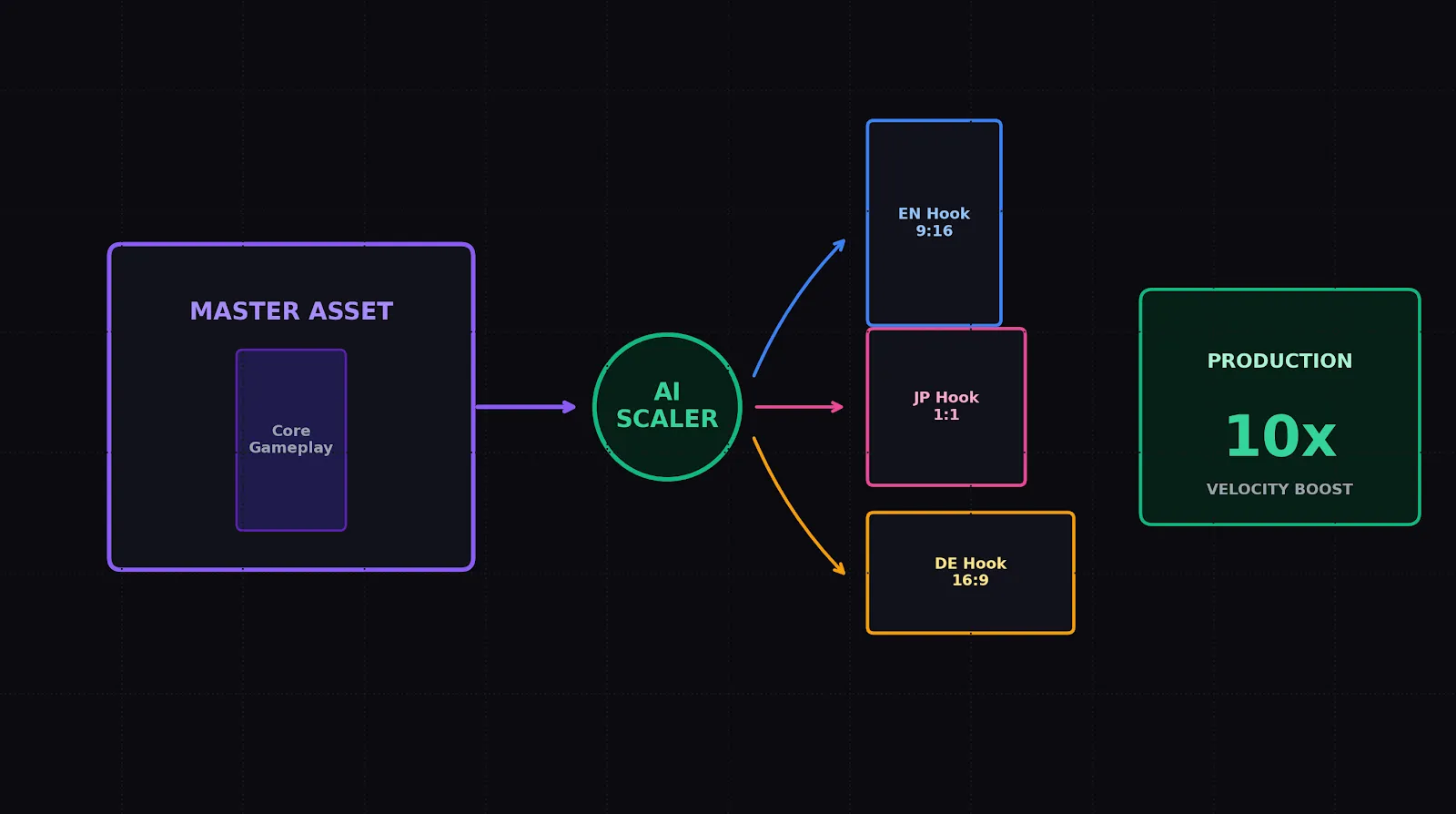
Every user acquisition (UA) manager running campaigns for mobile games knows the feeling of watching a once-profitable creative slowly wither away. You find a winning angle, the Cost Per Install (CPI) drops, the return on ad spend (ROAS) spikes, and for a brief moment, you can breathe. Then, creative fatigue hits. Within days, your metrics slide back into the red.
Historically, solving this problem required scaling your creative design team. You had to hire more motion designers, editors, and 3D animators to manually churn out gameplay variations, change background colors, swap out text overlays, and export localized versions. This approach is slow, expensive, and incredibly difficult to scale.
To maintain profitable UA campaigns, you must decouple creative volume from manual labor. This guide breaks down how modern game studios build an automated production pipeline, leveraging generative technology to build a highly scalable game studio ad creative platform that keeps your ad accounts filled with high-performing assets.
1. The Scaling Bottleneck: Why Traditional Pipelines Fail
In traditional game studio pipelines, creating an ad variation is treated as a bespoke art project. A designer has to open up After Effects or Premiere, manually adjust keyframes, change the text, re-render the video, and upload it to a shared drive.
This approach creates three massive bottlenecks:
- The Rendering Delay: Waiting for complex video projects to export and render limits the number of variations you can test each week.
- The Localization Wall: Translating and rebuilding text hooks for ten different global regions eats up hours of designer time that could be spent on high-level concepting.
- The Layout Challenge: Manually adjusting and rendering vertical, square, and landscape ratios for different ad networks (TikTok, Meta, Google AC) is highly repetitive and error-prone.
By automating these tedious tasks with an AI-driven production setup, you free your creative strategists to focus entirely on big-picture angles, while letting algorithms handle the heavy lifting of asset variation and generation.
2. Setting Up an Automated Game Ad Production Pipeline
To build an automated creative engine, you need to transition your production mindset from static video files to dynamic, modular assets.
┌─────────────────────────────────┐
│     1. INPUT INGREDIENTS        │ ──► Gameplay clips, raw footage, music tracks
└────────────────┬────────────────┘
                 ▼
┌─────────────────────────────────┐
│  2. GENERATIVE AI ENGINE        │ ──► Programmatic hook writer, asset compiler
└────────────────┬────────────────┘
                 ▼
┌─────────────────────────────────┐
│     3. MODULAR TEMPLATE         │ ──► Dynamic text areas, flexible asset slots
└────────────────┬────────────────┘
                 ▼
┌─────────────────────────────────┐
│     4. BATCH OUTPUTS            │ ──► 15+ hyper-targeted vertical ad variations
└─────────────────────────────────┘
An automated scaling pipeline relies on four core elements:
I. The Asset Bank (Raw Footage)
Your design team only needs to deliver high-quality, raw ingredients once. These are compiled into an organized library:
- The Background Hook Library: 3-second gameplay recordings showing high-contrast fail states, satisfying sorting loops, or dramatic character choices.
- The Core Gameplay Loop: Clean, unedited 15-second screen recordings of your game’s core loop.
- The Audio Library: Sound effects (ticking timers, explosion sounds, satisfying dings) and trending background beats.
II. The Generative Scripting Engine
Instead of manually writing ten variations of a hook, use an LLM configured to act as a direct-response mobile game copywriter. You can prompt it to output distinct text overlay variations targeted at different player motivations (e.g., competition, relaxation, problem-solving).
III. The Modular Template
Using an automated video editing workflow, you construct a master template where the background video clips, the voiceover tracks, and the text overlays are treated as dynamic, hot-swappable layers.
IV. The Batch Generator
Instead of manually editing and exporting each video, you feed your asset bank and your text variations into your automated pipeline to dynamically compile and render 15+ variations in a single run.
3. Top AI Scaling Strategies for Game UA
Once your automated pipeline is in place, use these three high-performing variations to rapidly scale your creative volume and lower your cost per install (CPI).
Strategy A: The Motivation-Based Hook Swap
Different players download the same game for completely different reasons. A casual puzzle game appeals to one player who wants to relax (escapism) and another who wants a hard mental challenge (achievement).
Use your automated engine to swap out the opening text hook and matching background gameplay to target these distinct motivators:
- The Achievement Angle: “Only 1% can solve this level…” paired with a challenging, complex puzzle layout.
- The Relaxation Angle: “The most satisfying way to unwind…” paired with a smooth, perfectly aligned sorting visual.
Strategy B: The Multi-Language Localizer
Entering new global markets is one of the fastest ways to scale a game, but localizing ad creatives manually is highly demanding.
By integrating automated translation and text-to-speech features into your asset engine, you can take a winning English creative, instantly translate the on-screen text into Japanese, German, or Portuguese, generate a native-sounding localized voiceover, and output fully localized assets ready for regional UA campaigns.
Strategy C: The Multi-Format Aspect Ratio Auto-Resizer
Ad networks favor different video aspect ratios depending on where the ad is served. Running vertical $9:16$ video on placements designed for square $1:1$ or landscape $16:9$ can hurt your performance.
Your automated pipeline should take your master asset and programmatically generate all three formats, automatically centering the action in the safe zones so that no critical gameplay UI or text overlays are cut off by native social interfaces.
4. Structuring a Creative Fatigue Defense System
Having the ability to generate dozens of video variations is incredibly powerful, but you must structure your testing so you don’t overwhelm the ad network’s algorithm.
To run a highly efficient testing schedule:
- Isolate the Test Variables: Only test one element at a time. If you are testing five different opening hooks, keep the core gameplay body, the music, and the call to action completely identical.
- Use Ad Group Budget Allocation (ABO): Deploy your variations into separate ad groups with identical daily budgets. This forces the ad network to spend an equal amount on each variation, giving you clean data on which asset actually converts best.
- Monitor Key Creative Metrics: Keep a close eye on your 3-second view-through rate (thumb-stop rate) to evaluate hook performance, and your 10-second hold rate to evaluate the quality of your core gameplay body.
- Retire and Replace: The moment a winning ad’s performance starts to decline, retire it and instantly launch three minor variations of that exact winning angle using your automated generation pipeline to sustain your campaign’s momentum.
5. Seamless Creative Scaling with PixelPlot
Manually coordinating designer assets, scripting variations, translating copy, and rendering multiple video formats remains a massive operational bottleneck for growing studios.
To eliminate this manual friction, performance marketing teams leverage a unified creative scaling platform gaming setup like PixelPlot. Our platform automates the pre-production and scaling loop, letting you instantly generate, localize, and resize high-converting ai content creator for game ads to keep your campaigns performing at their peak.
By combining direct-response psychology with programmatic asset scaling, you take the guesswork out of creative production, building a high-velocity testing engine that drives continuous, profitable growth for your mobile titles.
Organize Your Modular Production Pipeline
Want to optimize your asset workflow before running your next batch? Discover how to visually structure your modular concepts, map out player action sequences, and check safe-zone layouts in our complete guide to building a TikTok ad storyboard template today.